

Most Australian homes have at least one reverse-cycle split system, and most of them are controlled by a plastic remote that lives somewhere between the couch cushions. The good news: you almost never need to replace the unit to get app control, scheduling and voice commands. The head unit already listens for infrared, and a smart IR controller sitting on a nearby shelf can imitate your remote perfectly.
This guide covers the practical bits — which type of controller to buy, where to physically put it, how to get it talking to Google Home or Alexa, and the limits you should know about before you spend money.
How a smart IR controller actually works
Your remote isn't a thermostat. When you press "22 degrees, cool, fan auto", the remote transmits the entire state of the settings as one infrared burst. The head unit receives it, acts on it, and beeps. It has no way to report back what it's doing.
A smart IR controller replicates that burst over Wi-Fi. You tell the app "22, cool, auto", the controller fires the matching IR code across the room, and the split system obeys — exactly as if you'd used the remote.
The consequence of this one-way relationship matters. Because the aircon can't talk back, the app is guessing at the current state. If someone picks up the physical remote and turns the unit off, a basic controller will still show it as running. Better controllers work around this in two ways: an onboard temperature sensor so the app knows the actual room conditions, and an IR receiver that watches for remote presses and updates its own state accordingly. That second feature is the single biggest difference between a $30 puck and a $170 device, and it's worth paying for in a busy household.
A further consequence: mounting position is not optional decoration. More on that shortly.
Choosing a controller: budget puck, mid-range, or sensor-led
There are three broad tiers on the Australian market.
Budget Tuya/Smart Life IR blasters (roughly $20–$45 [VERIFY] on Amazon AU, eBay AU, or Kogan) do the core job. You pick your aircon brand from a code library, test a few code sets until the unit responds, and you're done. They work with Google Home and Alexa through the Tuya or Smart Life app. Expect no feedback, basic scheduling, and cloud dependence.

Tuya Smart Wifi IR Air Conditioner Controller Thermostat
Mid-range dedicated aircon controllers add a temperature and humidity sensor, proper climate scheduling, and often a follow-me style mode where the controller uses its own reading rather than the head unit's internal sensor — which is usually mounted up near the ceiling where the air is warmest.
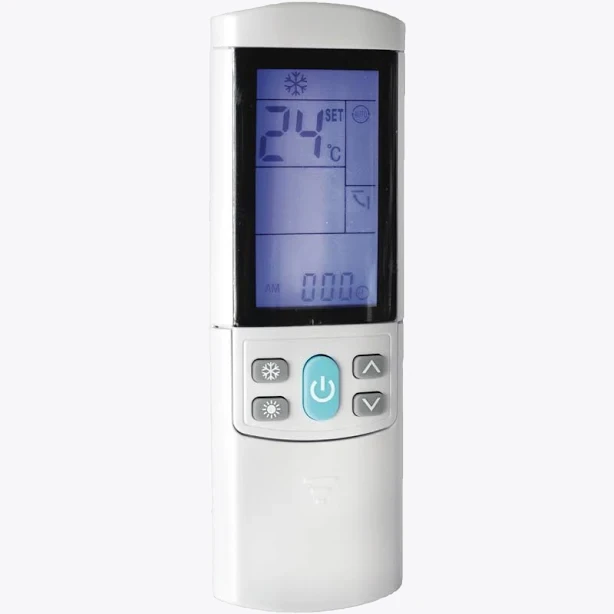
Aircon Off Universal Air Conditioner Smart Remote
Sensor-led controllers are the ones that behave like a genuine thermostat. Sensibo's Air is the best known here: it reads room temperature and humidity, detects remote presses so state stays accurate, supports geofencing, and exposes a proper climate entity to Google Home, Alexa, Apple Home and Home Assistant. Expect somewhere in the $150–$220 [VERIFY] range depending on the retailer and model variant.

Sensibo Air Smart Air Conditioner Controller
Also stocked at: Amazon AU
On specification, the sensor-led option is the one that turns a dumb split system into something that behaves like a connected climate device. The budget blaster turns it into a remote you can shout at. Both are legitimate outcomes — just buy the one that matches what you actually want.
Where to mount it, and why that decides whether this works
IR is line of sight. Not "roughly in the direction of". The controller needs a clear, unobstructed path to the receiver window on the head unit, usually on the lower right of the front fascia.
Practical placement rules:
- Direct line of sight, within about 6–8 metres. Beyond that, reliability falls away, especially in bright rooms.
- Bounce is real but unreliable. Signals do reflect off white walls and ceilings, so an angled position often works. Test it before you commit to double-sided tape.
- Avoid direct sunlight and downlights. Strong infrared from sunlight or halogens can swamp the receiver.
- Keep it near a power point. These devices run on 5V USB, so a nearby Type I outlet with a USB adaptor, or a spare port on a powerboard, is all you need. No electrical work, no licensed trade.
- Mind the Wi-Fi band. Almost all of these controllers are 2.4GHz only. If your router uses a single merged SSID for both bands, you may need to temporarily split them or use the router's band-steering exception during pairing.
If the split system is above a doorway on the opposite side of an L-shaped room, accept that you may need a second controller rather than fighting the physics.
Step-by-step setup
- Note your aircon brand and remote model. The model number on the back of the remote matters more than the brand on the wall unit — it's how code libraries are organised.
- Power the controller and pair it to 2.4GHz Wi-Fi using the vendor app. Have your Wi-Fi password handy; most of these use a SoftAP or Bluetooth-assisted pairing flow.
- Point the controller at the head unit and run the code-matching wizard. You'll be asked to try a code set, then confirm whether the unit responded. Some brands match first try; obscure or older units may take a dozen attempts.
- Verify every function you care about — cool, heat, dry, fan speed, swing, and the exact temperature. Some code sets get power and temperature right but map swing incorrectly.
- Link to your voice assistant. In the Google Home app, add the manufacturer's service under "Works with Google"; in Alexa, enable the matching skill. Assign the device to a room so "turn on the aircon in the lounge" resolves correctly.
- Set the display name to something you'd actually say. "Lounge aircon" beats "Sensibo Pod 4A2B" every time.
Getting more than a voice remote out of it
Once it's connected, the automations are where the value sits:
- Geofenced off — turn heating off when the last phone leaves home. This alone often pays for the device over a winter of forgotten mornings.
- Pre-conditioning — start heating 20 minutes before your usual arrival, based on location rather than a fixed clock.
- Open-window shutoff — pair with a contact sensor so the unit stops when a door is left open.
- Overnight comfort profiles — step the setpoint down through the night rather than running one temperature.
- Solar-aware cooling — if you have a monitored solar system, trigger cooling during peak export instead of during evening peak tariff.
In Home Assistant, Sensibo has a first-party integration exposing a full climate entity. Tuya-based blasters can be brought in via the Tuya integration or LocalTuya, though the latter can be fiddly and IR devices don't always expose clean climate entities locally [VERIFY]. If local-only control is a hard requirement, check current community reports for your specific model before buying.
What this approach won't do — and when to call a professional
An IR controller can't read the compressor, error codes, filter status or power consumption. It also can't control ducted systems that use a wall controller rather than an infrared remote, or systems where the remote is hard-wired.
For those, manufacturers sell proprietary Wi-Fi interface kits — Mitsubishi Electric, Daikin, Fujitsu and Panasonic all offer them. These typically connect to the indoor unit's internal control board and, in Australia, installation is generally treated as work for a licensed electrician or refrigeration technician. Opening the head unit yourself risks your warranty and is not a DIY job under AS/NZS wiring rules [VERIFY — confirm requirements with your installer and the manufacturer]. Get a quote before assuming the IR route is the cheaper option; on some brands the factory module isn't far off the price of a good IR controller.
One last thing worth saying plainly: energy savings from smart control come from not running the aircon when nobody's home, not from the device itself. Set up the geofence and the schedule properly and the payback is real. Install it, use it as a voice remote and change nothing else, and you've bought convenience — which is fine, just go in with clear eyes.


