

When the power drops or the NBN falls over, most home camera systems quietly stop doing their job. The cameras lose power, the router loses power, and even if the cameras have their own batteries, the cloud upload has nowhere to go. Storms are exactly when you'd want the footage.
The good news is that a camera setup only draws a handful of watts. Keeping it alive through a typical outage is one of the cheaper resilience projects in a smart home — if you back up the right things in the right order.
First, work out which failure you're solving
Blackouts and internet outages look similar from the app, but they need different fixes.
Mains power loss. Everything goes: cameras, PoE switch, NVR, modem, router, Wi-Fi mesh nodes. Even battery cameras go dark in practice, because the Wi-Fi they talk to is gone.
Internet loss with power intact. Cameras and local recording keep working. What you lose is remote viewing and push notifications — and, on cloud-only cameras, the recordings themselves.
Partial NBN failures. On FTTP, the network termination device in your house needs mains power; some installations include an optional battery backup unit, and where fitted it is generally intended to support the phone port rather than data [VERIFY]. On FTTN and FTTC, the street-side equipment has its own power and battery arrangements you can't control [VERIFY]. Either way, assume your connection is down the moment your house is.
Work out which of these worries you most, because the answer changes what you buy.
Back up the network before you back up the cameras
This is the step people skip. A camera with a charged battery and no working Wi-Fi is a camera that records nothing you can see.
The priority order for backup power is:
- NBN NTD / modem — the box the line terminates in
- Router and any mesh node the cameras associate with
- PoE switch and NVR, if you run wired cameras
- The cameras themselves, if they're mains or PoE powered
A typical modem-plus-router pair draws roughly 15–30W combined [VERIFY]. Add a small PoE switch with three or four cameras and you're perhaps 40–60W [VERIFY]. That's a modest load, which is why a small UPS goes a surprisingly long way.
A consumer line-interactive UPS in the 650–1000VA class sells for roughly $130–$300 in Australia at retailers like Officeworks, JB Hi-Fi and Amazon AU [VERIFY]. Realistic runtime on a 25W network load is often in the one-to-three-hour range, depending on battery health and model [VERIFY]. Check the manufacturer's runtime chart rather than the VA number on the box — VA is a headline figure, not a promise of hours.
One caveat worth knowing: many cheaper UPS units output a stepped (simulated) sine wave on battery. Network gear and camera power supplies usually tolerate this fine, but it's worth confirming compatibility with anything sensitive [VERIFY].
Portable power stations: longer runtime, more flexibility
If your area cops multi-hour outages — bushfire season, storm season, rural feeders — a lithium power station gives far more headroom than a UPS, and you can use it for the fridge or phone charging once the cameras are sorted.
The practical maths is simple. Divide usable watt-hours by your load in watts, then knock about 15% off for inverter losses. A 500Wh unit running a 25W modem and router works out at roughly 17 hours before losses, so call it 14 [VERIFY]. That covers almost any suburban outage.
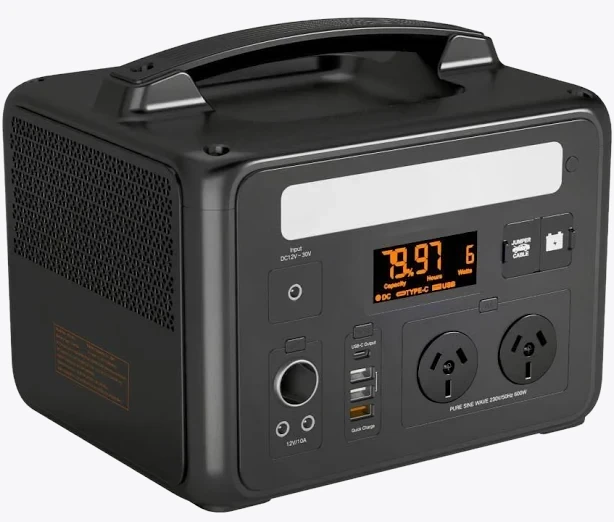
VoltX E600 Portable Power Station
Also stocked at: Woolworths
Two things to check before you rely on one as backup: whether it supports pass-through charging so it can sit permanently plugged in with the router connected, and whether it has a UPS-style automatic switchover fast enough that your gear doesn't reboot [VERIFY on the specific model — many power stations switch over in tens of milliseconds, which is fine for routers, but not all models advertise it]. If it can't switch automatically, you'll be plugging things in by torchlight.
All of this runs on standard 240V Type I outlets. Anything involving new circuits, hardwired camera power, or a permanently installed backup supply is licensed electrician territory under AS/NZS wiring rules — don't improvise it [VERIFY current requirements with your electrician].
Battery cameras and local recording keep working when the cloud doesn't
Battery-powered cameras solve the power half of the problem by design. They're also the only realistic option for renters, since there's no cabling and no drilling into someone else's walls.

Arlo Ultra 2 4K Spotlight Camera
Best for: Ultra HD 4K video resolution with ultra-wide 180-degree diagonal view
The specification implies a camera like this will keep detecting and recording locally to its hub for as long as the battery lasts, but the value of that depends entirely on where footage is stored. If your system is cloud-only, an internet outage means events are detected, uploaded to nothing, and in some cases discarded. Check whether your cameras or hub support local storage — microSD, USB drive or an internal disk — and turn it on. That single setting is often the difference between "we lost the night of the break-in" and a usable file.
Home Assistant users have an advantage here: an RTSP-capable camera recording to a local NVR (Frigate, Scrypted, Blue Iris or similar) on a UPS keeps recording regardless of what the NBN is doing. The internet only affects your ability to watch it from the pub.
Add a mobile failover path for alerts
Backup power keeps the gear alive; it doesn't restore your internet connection. For alerts to reach your phone during an NBN outage you need a second path.
- Router with 4G/5G failover. Many mid-range routers accept a SIM or a USB modem and switch automatically. A cheap prepaid data SIM costs very little to keep active, and camera alerts use minimal data — full-quality video streaming does not, so cap the quality while on mobile.
- A phone hotspot. Free, manual, and requires you to be home and awake. Better than nothing.
- Mobile-connected cameras. Some models take their own SIM. Useful at sheds and rural properties with no fixed line.
Also confirm your mobile coverage indoors. If the same storm has knocked out the local mobile tower's backhaul, no amount of failover helps.
Know when the power comes back
A small but genuinely useful addition: a smart plug on a non-critical circuit acts as a power sentinel. When mains returns, it reconnects and reports online, and you can automate a notification from that event in the vendor app or Home Assistant.
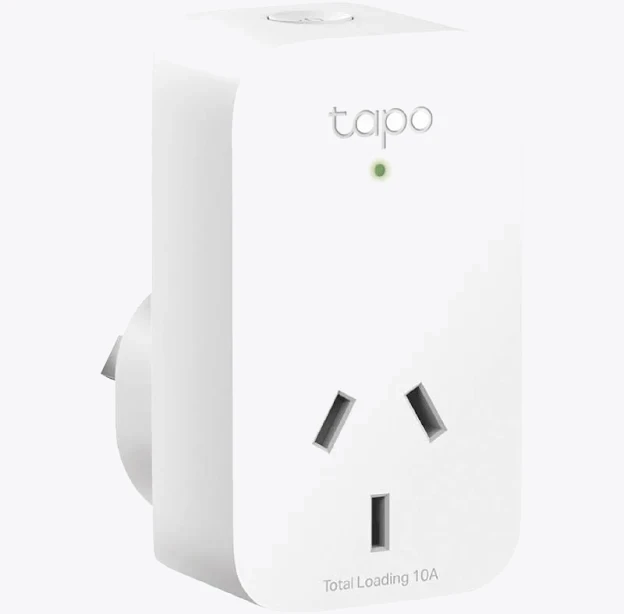
TP-Link Tapo P100 Mini Smart Wi-Fi Socket Plug
Some smart plugs also have a configurable power-on state, which matters if you want a device to come back up automatically rather than staying off after an outage. Worth checking that setting on anything you rely on.
A practical setup checklist
- Put the NTD, modem and router on the UPS or power station first, before the cameras.
- Measure the actual load with an energy meter or the UPS display, then calculate runtime honestly.
- Enable local recording on every camera or hub that supports it.
- Configure 4G/5G failover and test it by unplugging the WAN cable, not by assuming.
- Twice a year, pull the plug on the UPS and time how long the network stays up. UPS batteries typically need replacing every three to five years [VERIFY against your model's documentation].
- Note which cameras are cloud-dependent, and treat those as bonus coverage rather than your primary record.
Do those six things and a blackout becomes an inconvenience rather than a blind spot.


