

Renting shouldn't mean living with a bare 60-watt equivalent globe on a builder-grade batten holder. The good news is that almost everything interesting in smart lighting now happens above the wiring — in the globe, in the plug, or on a stick-on switch that never touches your walls' internals.
The practical takeaway: build your rental lighting around three things you own and can unscrew — smart globes, smart plugs for lamps, and battery-powered wall controllers. Leave the fixed wiring exactly as you found it, keep every original globe and switch plate in a labelled box, and your move-out reset is a half-hour job.
Start With What Screws Out: Globes
The single highest-impact change in a rental is swapping the globe. No tools, no landlord conversation, no risk.
Before you buy anything, work out which fitting you have. Australian homes are a mixed bag:
- B22 bayonet — the classic two-pin push-and-twist. Still very common in older rentals and pendant fittings.
- E27 Edison screw — increasingly the default on newer lamps and fittings.
- E14 small Edison screw / B15 small bayonet — bedside lamps, some wall sconces.
- GU10 — twist-lock downlights. Replaceable, and smart GU10s exist.
- Integrated LED downlights — the round sealed units in most homes built or renovated in the last decade. These are not replaceable by you. The LED, driver and housing are one unit hardwired into the ceiling. Changing them is electrical work.
That last point matters. In Australia, altering fixed wiring — including swapping a hardwired downlight or replacing a wall switch — is work for a licensed electrician under AS/NZS 3000 wiring rules, and DIY mains work is illegal for unlicensed people in every state and territory [VERIFY]. Screwing in a globe is not electrical work. Rewiring a fitting is.
Budget roughly $15–$35 AUD for a decent colour smart globe and $10–$20 for a warm-white-only one at Bunnings, Officeworks, JB Hi-Fi or Amazon AU [VERIFY]. Buy one, live with it for a week, then scale up. Colour is fun for about a fortnight; tunable white — cool and energising in the morning, warm at night — is the feature you'll still be using in a year.
Lamps, Plugs and Powerboards
Here's the trick most renters miss: you don't have to light a room from the ceiling at all. A couple of floor and table lamps on smart plugs will out-perform a single harsh ceiling globe in every way, and lamps come with you.
A smart plug turns any dumb lamp into a scheduled, voice-controlled one. Australian smart plugs are Type I (our angled-pin plug) and rated for 240V — never buy an imported unit with a US or EU pin pattern and run it on an adaptor.
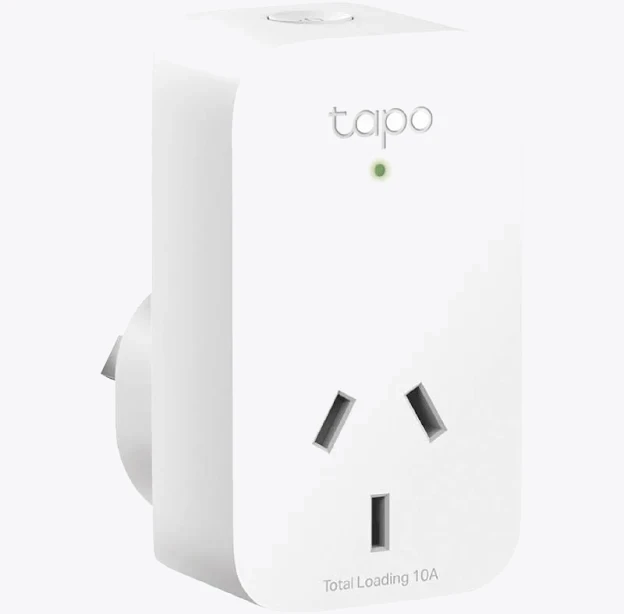
TP-Link Tapo P100 Mini Smart Wi-Fi Socket Plug
One caution on physical fit: Australian double GPOs are close together, and chunky smart plugs can block the socket next to them. "Mini" models are worth the search. Check the switched-load rating too — a plug rated for a 10A general outlet is fine for lamps, but don't run a heater or a dryer through one.
If a whole corner of the room needs controlling — lamp, TV, a strip light behind the shelf — a smart powerboard gives you individually switched outlets from one wall socket, which is tidier than three plugs fighting over two GPOs.
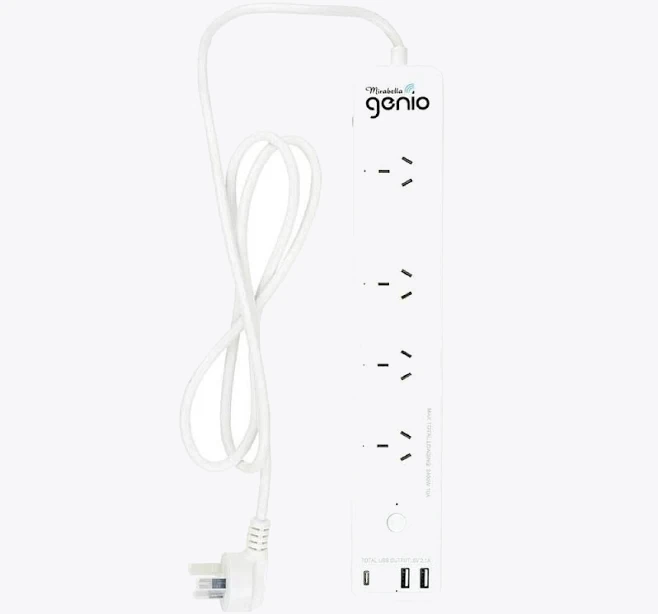
Smart Mirabella Genio Wi-Fi Powerboard
While you're at it: measure your standby draw. Lighting is a small slice of an Australian power bill, but the entertainment corner is often not.
Switches That Don't Touch the Wall
The classic smart-lighting failure is the flatmate who flicks the wall switch off, cutting power to your smart globes and breaking every automation until someone flicks it back.
Three renter-safe fixes:
- Battery-powered wireless wall buttons. Zigbee or Thread scene switches that mount with 3M adhesive strips or a single small screw. They don't switch mains at all — they send a radio command to the globe. Stick one beside the real switch and train the household to use it. Around $25–$50 AUD each [VERIFY].
- Switch guards. A cheap plastic cover or even a strip of gaffer tape over the existing switch. Ugly, free, effective.
- Remotes on the coffee table. No mounting at all.
Adhesive is the thing to be careful with. Removable command-style strips are far kinder to rental paint than permanent VHB tape — and on freshly painted or low-quality plasterboard, even the removable ones can lift colour. Test on an inconspicuous patch first, remove by stretching the tab slowly downward rather than pulling outward, and warm the adhesive with a hairdryer if it resists.
LED strip lighting deserves the same warning. Stick strips to the underside of shelves, the back of a bedhead, or inside an aluminium channel you own — not directly to a painted wall. Powered from a plugpack into a normal GPO, a strip is just an appliance.
Wi-Fi or Zigbee: Choosing a System That Moves House With You
For five or fewer lights, plain Wi-Fi globes are the least hassle. No hub, no extra box, works on the router the landlord's NBN connection feeds.
Past about ten devices, Wi-Fi starts to grate. Cheap routers choke on the device count, and every globe is another thing to re-onboard when you move and the network name changes. Zigbee or Thread globes talk to a hub instead, forming a mesh that gets stronger as you add mains-powered devices. When you move, you take the hub, plug it into the new router, and the globes reconnect to the hub — not to the internet — so the re-setup is one device, not twenty.

Tuya Zigbee Matter Thread Gateway Smart Home Bridge Matter Hub
If you're heading towards Home Assistant, a USB Zigbee coordinator plugged into a mini PC or Raspberry Pi gives you local control with no cloud dependency — useful in a rental where the internet connection may be shared, metered or temporary.
Whichever you pick, favour Matter support where you can get it. It's the closest thing to insurance that your globes will still pair with whatever ecosystem you're using in the next place.
The Move-Out Reset
Do this on day one, not moving day.
- Keep every original globe. Label a box "HOUSE GLOBES – kitchen x4, hall x1" and put it on the top shelf of the linen cupboard. Landlords notice a warm-white kitchen that's suddenly daylight-white.
- Photograph fittings before you change anything. Timestamped photos of the original state are the cheapest bond insurance going.
- Never remove or reposition a hardwired fixture. If a fitting is dead or a switch is faulty, that's a repair request to the agent, not a weekend project.
- Factory-reset and unpair everything before you unplug it. Especially if you're leaving a device behind or selling it.
- Remove adhesive slowly and check the wall while you still have time to touch it up.
One more thing worth raising with your agent in writing: some leases include clauses about "alterations or additions", and whether a stuck-on switch counts is genuinely arguable. Tenancy law differs by state and territory and is not settled on smart-home fittings [VERIFY]. A short email asking permission for anything adhesive costs nothing and gives you a paper trail. Screw-in globes and plug-in devices are almost universally fine.
Build it right and the whole system is a cardboard box and an afternoon at the other end — which is exactly how rental tech should work.


