

Most robot vacuums sold in Australia ship as cloud appliances. You press "clean" in the app, the command goes to a server (often in China, sometimes Singapore or the US), and the server tells the robot sitting six metres away to start. It works, right up until the internet drops out, the vendor changes the API, or you'd simply rather your floor plan wasn't sitting on someone else's hardware.
The good news: a meaningful subset of robots can be made to run entirely on your LAN with Home Assistant. The less good news is that it depends heavily on the model, and the best options involve rooting.
The short version: three tiers of "local"
It helps to be precise about what people mean by local control, because the marketing blurs it.
Tier 1 — Cloud only. The Home Assistant integration logs into the vendor's account and relays commands via the internet. Nothing works offline. Most Ecovacs, Roborock (stock firmware), Eufy and Samsung robots sit here by default. It's still automatable — it's just not resilient.
Tier 2 — Local API, cloud-assisted setup. The robot speaks a documented or reverse-engineered protocol on your LAN, and Home Assistant talks to it directly once you've extracted a token or key. Older Xiaomi/Roborock models are the classic example via the xiaomi_miio integration. Commands are local; maps and firmware updates may still involve the cloud.
Tier 3 — Fully local, cloud severed. The vacuum runs replacement firmware or a patched interface — Valetudo is the main project — that removes the vendor cloud entirely and exposes MQTT to Home Assistant. Live maps, zone cleaning, fan speed, consumable counters, all on your network. This is the real thing.
If resilience matters to you, aim for Tier 3 and treat Tier 1 as a fallback.
Valetudo: the genuinely local route
Valetudo is open-source firmware-side software that replaces the cloud connection on supported Dreame, Roborock, Viomi and a few other robots. It doesn't replace the robot's core navigation firmware — it hijacks the bit that phones home and gives you a local web UI plus MQTT with Home Assistant auto-discovery.
What you get once it's running:
- Start, stop, spot and zone cleaning as native HA entities
- Live map with room segmentation (via the
valetudo-map-cardor the ICantBelieveItsNotValetudo camera add-on) - Fan speed, water flow, mop settings
- Consumable life sensors — brush, filter, sensors — which are perfect for maintenance reminders
- No internet dependency at all
The catch is installation. Rooting is model-and-firmware-specific. On many Dreame units it means opening the case, shorting test pads or connecting a USB cable to an internal port, and flashing a patched image. On some models the process is fully documented and takes half an hour; on others it requires soldering, or the current firmware has closed the hole.
Dreame's mid-to-upper range has historically been the most Valetudo-friendly family, and the L10s Ultra generation is well documented in the project's device list.
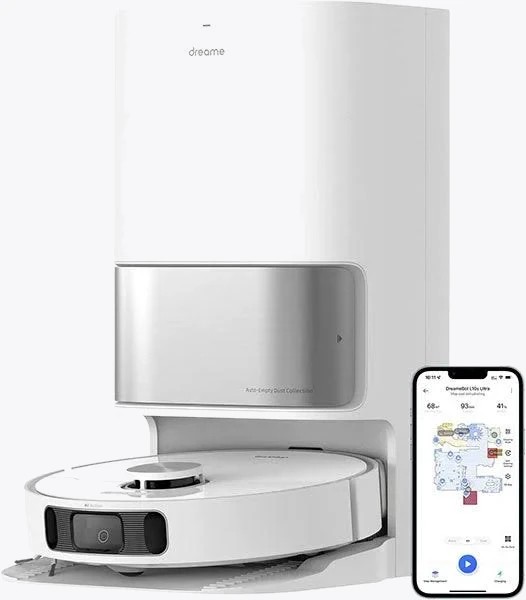
Dreame L10s Ultra Robot Vacuum and Mop
Best for: 5,300 Pa suction with automatic mop washing & hot air drying
Before you buy anything specifically to root it, check three things: the exact model number (regional variants differ), the firmware version it ships with, and whether Valetudo's supported-devices page lists a working method for that combination [VERIFY — support status changes with each vendor firmware release]. Buying a unit and finding it shipped with patched firmware is the most common disappointment.
And be clear-eyed: rooting almost certainly voids the manufacturer warranty. Your Australian Consumer Law rights for a major failure unrelated to the modification are a separate question and not one to assume either way [VERIFY — seek advice for your situation]. If the vacuum is a $1,500 appliance you can't afford to brick, this isn't the hobby for you.
When the robot stays cloud-tethered
Some brands simply don't have a local path. Ecovacs is the clearest example — the Home Assistant integration authenticates to Ecovacs' servers and relays everything through them. It works well and exposes plenty of controls, but pull the WAN cable and your automations stop.

Ecovacs Deebot X2 Omni Square Robot Vacuum
Best for: Fitting under low-profile Australian furniture and square corner cleaning
That's not automatically a dealbreaker. A cloud-connected vacuum with a strong app, good edge-cleaning geometry and a reliable auto-empty dock may still be the better appliance for your house than a rootable one you fight with monthly. Just decide deliberately: are you buying a smart-home component or a floor cleaner that happens to have an app?
If you go cloud, mitigate it:
- Put the vacuum on an IoT VLAN or guest network so it can reach the internet but not your NAS or cameras
- Build automations that degrade gracefully — don't make your morning routine depend on a
vacuum.startcall succeeding - Keep a physical button or dock control in the loop for when the API has a bad day
Local triggers matter more than local commands
Here's the part people miss. Even with a cloud vacuum, you can make the decision-making local, which is where most of the reliability lives.
The pattern that works best in Australian homes: a Zigbee sensor network feeding Home Assistant, with the vacuum as the actuator. Door sensors on the laundry so the robot doesn't run while the dog's food bowl is out. A presence sensor so it only cleans when the house is empty. A vibration sensor on the dryer. All of that runs on your own coordinator with zero internet.
A USB Zigbee coordinator plugged into whatever runs Home Assistant is the cheapest way in, and it's the single highest-value $30-odd [VERIFY pricing] you'll spend on a local-first setup.

SONOFF Zigbee 3.0 USB Dongle
Use a USB 2.0 extension lead to get the dongle away from USB 3 ports and SSDs — the 2.4 GHz interference is real and it's the number one cause of flaky Zigbee networks. Also pick a Zigbee channel that doesn't overlap your Wi-Fi; channels 15, 20 and 25 are the usual safe picks.
Matter won't rescue you yet
Matter 1.2 added a robot vacuum device type, and Matter is local by design — commands travel over your LAN, not a vendor server. On paper that solves everything.
In practice, as of writing, Matter's vacuum support covers a fairly thin slice: start, stop, return to dock, basic run modes. No maps, no room selection, no zone cleaning, no mop pad state [VERIFY against current spec revision]. Vendors that support it typically keep the rich features in their own app. So Matter gets you a reliable local on/off switch, which is genuinely useful for automations, but it isn't a replacement for Valetudo or a full local integration today.
It's worth checking Matter support when buying, because it costs nothing and it's the most likely long-term path to local control without rooting.
A sensible plan
If you want local control and you're starting from scratch:
- Decide your tolerance for tinkering before you shop. Be honest.
- If it's high, cross-reference the Valetudo supported-devices list against what Australian retailers are actually stocking, and check the model suffix carefully — AU stock sometimes differs from EU listings.
- If it's low, buy the best appliance for your floors, accept the cloud integration, isolate it on an IoT network, and put your effort into local Zigbee triggers instead.
- Either way, build automations that fail quietly. A vacuum that doesn't start is an annoyance; a morning routine that hangs waiting for a cloud response is a support ticket from your household.
Nothing here involves mains wiring — robot vacuums and docks run from a standard Type I 240 V outlet — so there's no licensed electrician required. If you're adding a dedicated outlet in a cupboard for the dock, that's fixed wiring, and that's a licensed electrician's job under AS/NZS 3000.


