

A blackout is exactly when you want your cameras working, and it's usually the moment they stop. Most home CCTV setups have three single points of failure stacked on top of each other: mains power to the cameras or recorder, mains power to the modem and router, and the NBN service itself. Knock out any one and a cloud-based camera goes dark.
The fix isn't complicated, but it does need to be deliberate. Below is how the failure chain actually works, and what to do about each link.
What actually fails when the power drops
Work through your own setup in this order:
Your NBN connection equipment. On FTTP, HFC and fixed wireless there's an NBN-supplied network termination device in your home that runs on your power. No mains, no NTD, no internet — even if the network outside is fine. FTTN and FTTC draw signal from a powered node in the street, which has its own limited battery reserve, but your modem is still on your electricity bill. Some FTTP installs have an optional battery backup unit for the voice port, which does not keep the data ports alive [VERIFY with your retailer for your connection type].
Your router and any Wi-Fi mesh nodes. These die instantly. Wi-Fi cameras then have nothing to associate with.
The cameras and recorder. PoE cameras are powered from the NVR or a PoE switch, so both need backup. Plug-in Wi-Fi cameras need their own outlet.
The NBN service itself. A network fault or a planned outage takes your internet away while the lights stay on. Cloud-only cameras stop uploading, stop sending notifications, and in many cases stop recording altogether.
That last point matters most: power backup and internet backup are two separate problems, and you need an answer to both.
Step one: put the network and recorder on a UPS
The cheapest meaningful upgrade is a line-interactive UPS or a portable power station with UPS pass-through, feeding your modem, router and NVR from one point.
Rough draw for a typical Australian setup:
- NBN NTD: 5–10 W
- Modem/router: 10–20 W
- Mesh node: 5–10 W each
- 4-channel PoE NVR with four cameras: 35–60 W
Call it 60–100 W total. Divide usable battery capacity in watt-hours by that figure, then knock off 10–15% for inverter losses. A 600 Wh station running a 70 W load gives you roughly six to seven hours [VERIFY capacity and inverter efficiency against the model's published specs]. A small 650 VA desktop UPS, by contrast, is often only 20–40 minutes at that load — fine for a brownout, useless for a summer storm.
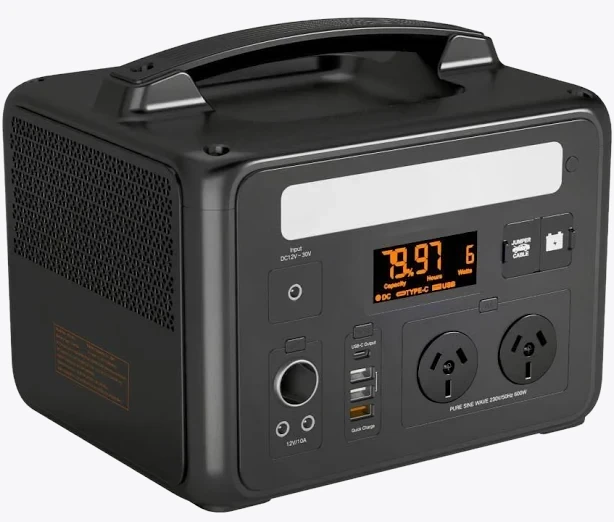
VoltX E600 Portable Power Station
Also stocked at: Woolworths
Two things to check before you buy any power station for this job. First, switchover time in UPS or EPS mode: if the changeover is slow, your modem may reboot and take two to three minutes to resync — an eternity if it happens repeatedly during a flickering supply [VERIFY the switchover figure on the spec sheet]. Second, whether the unit can stay plugged in and charging indefinitely without the manufacturer voiding warranty for pass-through use.
Electrical note: running an extension lead from a power station to your gear is fine. Hardwiring a backup supply, adding a new circuit, installing PoE cabling through walls or touching your switchboard is licensed electrical work under AS/NZS 3000 in every Australian state and territory. Get a licensed electrician [VERIFY current requirements with your state regulator].
Step two: record locally, not just to the cloud
If your cameras only record to a vendor's cloud, an NBN outage means no footage at all — the exact scenario where footage matters.
Prioritise systems that write to local storage first and treat the cloud as a copy:
- NVR or DVR with an internal hard drive. Keeps recording with zero internet. Just make sure the recorder itself is on the UPS.
- microSD in the camera. Common on Tapo, Reolink, Eufy and similar. Cheap insurance, but the card is stolen along with the camera.
- A hub with local backup storage. Some battery camera ecosystems record to the base station as well as the cloud.

Arlo Ultra 2 4K Spotlight Camera
Best for: Ultra HD 4K video resolution with ultra-wide 180-degree diagonal view
Battery cameras are the other half of this. A camera running on its own rechargeable pack doesn't care that the house has no power — it only cares whether it can reach a hub or Wi-Fi. Pair battery cameras with a hub on backup power and you have a system that survives a blackout end to end. Check whether your model supports local storage on the hub and whether that's tied to a subscription tier [VERIFY current plan inclusions, as these change].
Step three: add mobile data failover for NBN faults
For outages where the power is fine but the line is down, you need a second path to the internet.
Router with a SIM slot or USB modem failover. Many mid-range routers will fail over to a 4G/5G SIM automatically. A cheap prepaid data SIM on a different carrier to your NBN backhaul is the sensible choice — Telstra and Optus have separate networks, so a fault on one doesn't necessarily hit the other.
Standalone 4G modem on a smart plug. Lower cost, but it won't switch automatically unless your router supports dual WAN.
Phone hotspot. A manual fallback, not a plan.
Be realistic about wide-area events. In a regional blackout, mobile towers run on their own batteries and typically hold for a matter of hours before generators are needed [VERIFY current carrier resilience commitments]. Local recording is what carries you past that point.
Step four: know the moment it happens
If your network gear is on backup power but the rest of the house isn't, you can turn that asymmetry into an alert. Put a Wi-Fi smart plug on an ordinary, non-backed-up outlet and set an automation to notify you when it goes offline. The plug losing mains while the router stays up is a reliable blackout signal — and works in Home Assistant, or with the vendor app's offline notification if it offers one.
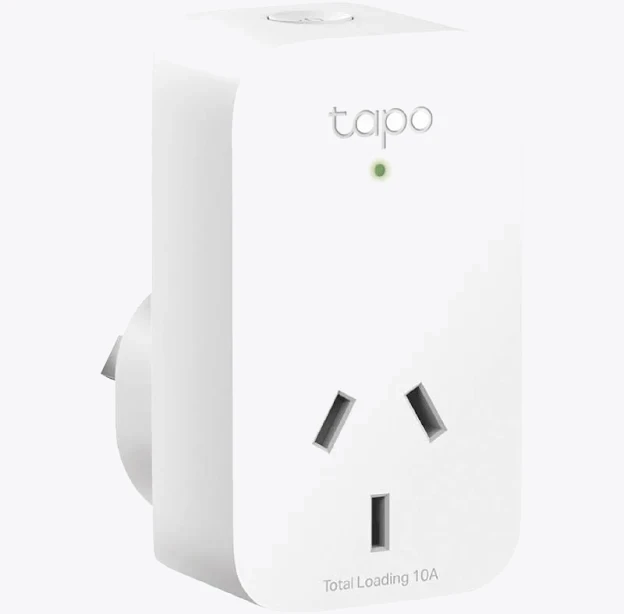
TP-Link Tapo P100 Mini Smart Wi-Fi Socket Plug
It's a two-minute setup that also tells you when power is restored, which is useful if you're away and need to know whether the freezer has been off for four hours or forty.
Test it before you need it
Once a quarter, pull the plug on the UPS input and time how long the system actually lasts. Confirm the cameras keep recording, the NVR keeps writing, and any 4G failover engages without you touching it. Batteries degrade, firmware updates change power behaviour, and a plan you've never tested is a guess.
One last consideration: recording obligations don't pause during an outage. Camera placement, audio recording and any monitoring that captures neighbouring property or shared areas are governed by state surveillance devices and privacy legislation, and the rules differ between jurisdictions and between owners and renters [VERIFY current requirements for your state and your tenancy agreement].


