

Every security camera sold in Australia eventually asks you the same question: where does the footage live? On a microSD card in the camera, on a hard drive in the cupboard, or on a server somewhere paid for monthly.
The answer changes what you pay over five years, what happens when your NBN connection drops out, and who else can potentially access video of your front door. It is worth ten minutes of thought before you buy, because most camera brands make the decision hard to reverse.
Practical takeaway: if you only need to check who knocked while you were out, local storage on a decent camera is enough. If the footage would need to survive a break-in, a fire or a stolen camera, you want a copy off-site — either a paid cloud plan or your own backup arrangement.
How local recording and cloud storage actually differ
Local recording means video is written to hardware you own. In practice that is one of three things:
- microSD card in the camera — cheapest, most common on Tapo, Reolink, Eufy and Aqara models. Typically 32GB to 256GB depending on what the camera supports.
- A base station or hub with internal storage — Eufy HomeBase, Arlo's SmartHub with USB storage, UniFi Protect consoles.
- A network video recorder (NVR) or NAS — a dedicated box recording multiple cameras continuously, often via PoE cabling. This is the approach Home Assistant and Frigate users tend to land on.
Cloud storage means the camera uploads clips (or a continuous stream) to the vendor's servers, and you pay monthly or annually for retention — usually 30 days on consumer plans.
The important distinction is not just where the file sits. It is what features the vendor ties to the subscription. Several brands gate person detection, vehicle detection, package alerts, activity zones and even rich notifications behind a paid plan, regardless of whether you also have a card in the camera. Check that before you buy, not after.
What subscriptions cost over five years
A single-camera cloud plan in Australia generally sits somewhere around $5–$15 per month, with multi-camera household plans in the $15–$30 range [VERIFY — check current AUD pricing directly with Arlo, Ring, Google and Eufy, as these change regularly].
Run that out. A $12/month plan is roughly $144 a year, or over $700 across five years — frequently more than the cameras themselves cost. A 128GB microSD card from Officeworks or Amazon AU is a one-off spend of roughly $25–$40 [VERIFY].
That maths does not automatically favour local storage, though. Cloud plans usually bundle:
- Off-site retention, so a stolen camera does not take the evidence with it
- Longer history than a small card can hold
- Smarter detection running on the vendor's servers
- Extended warranty or theft replacement on some plans [VERIFY per brand]
Arlo is the clearest example of a system built around the subscription model. The hardware is genuinely capable — 4K capture, integrated spotlight, colour night video on paper — but a meaningful share of the experience assumes an active Arlo Secure plan. The specification implies excellent image detail; the ongoing cost is the trade-off you are accepting.

Arlo Ultra 2 4K Spotlight Camera
Best for: Ultra HD 4K video resolution with ultra-wide 180-degree diagonal view
Your upload speed is part of this decision
This is the Australian-specific catch that overseas reviews skip. Cloud cameras upload, and most NBN plans are heavily asymmetric — a common 50/20 plan gives 20Mbps up, and entry-level 25/5 or 12/1 connections give far less [VERIFY current plan tiers with your RSP].
A single 2K camera streaming events may use 2–4Mbps while uploading. Four cameras all triggering at once on a 5Mbps upload will drop frames, delay notifications, and make video calls in the house stutter. Fixed wireless and Starlink users should be especially cautious, and anyone on a metered mobile broadband connection should treat continuous cloud recording as off the table.
Local recording sidesteps this entirely. Footage is written locally at full bitrate and only travels across your network when you open the app. If you are on a slow or capped connection, that alone can settle the argument.
Where local storage quietly fails
Local is not free of downsides, and the failure modes are ones people discover at the worst moment.
Card death. MicroSD cards in cameras are written to constantly in heat. Standard consumer cards fail. Buy high-endurance surveillance-rated cards and replace them every couple of years.
Theft. A camera taken off the wall takes its card with it. Base stations hidden inside the house solve this; cameras storing footage on-device do not.
Silent failure. A full or corrupted card often stops recording without an obvious alert. Check your footage monthly. Genuinely — put a reminder in your calendar.
Power cuts. An NVR with no power records nothing, and a blackout is exactly when you might want the cameras running. A small UPS or portable power station keeping the modem, router and recorder alive for a few hours removes that gap.
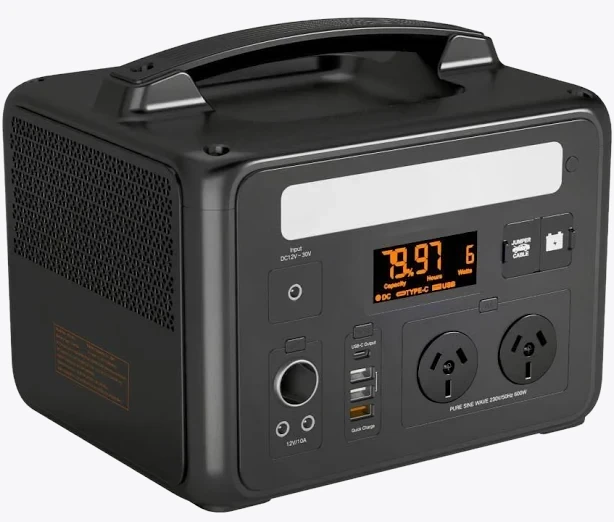
VoltX E600 Portable Power Station
Also stocked at: Woolworths
Remote access. Viewing local footage away from home still requires some path in — the vendor's relay servers, a VPN back to your house, or a service like Tailscale. Do not open ports directly to the internet.
Privacy, data and Australian law
Cloud storage means a third party holds video of your household. Where those servers are located, how long deleted footage is retained, and who can be compelled to hand it over are all worth reading the privacy policy for. Some brands store Australian customer data offshore [VERIFY per vendor].
Australian privacy and surveillance rules are not a single national rulebook. The Privacy Act's household exemption, state and territory Surveillance Devices and listening-device legislation, and body corporate rules can all apply differently depending on where you live and what your camera can see or hear [VERIFY — laws differ by state and change; seek legal advice for anything contentious].
Practical guidance that holds up regardless: point cameras at your own property, avoid capturing a neighbour's windows or a shared internal corridor, be careful with audio recording (it is treated more strictly than video in several jurisdictions [VERIFY]), and talk to neighbours before installing anything that overlooks their yard. Renters should get written landlord permission before drilling, and note that any camera requiring hard-wiring to 240V mains must be installed by a licensed electrician under AS/NZS wiring rules — a plug-in Type I unit is fine to install yourself, a hard-wired one is not.
The hybrid approach most homes end up with
You rarely have to pick one. A sensible middle path:
- Local as the primary record. High-endurance card or a base station with storage, so you always have full-quality footage without paying for it.
- Cloud for the one or two cameras that matter most. Front door and main entry. If those units are stolen, the clips still exist elsewhere.
- Or roll your own off-site copy. A NAS running Frigate or Scrypted, syncing important events to cloud object storage you control. More effort, no monthly vendor fee, and it works well alongside Home Assistant.
Choose local if you have slow upload, want no ongoing costs, run Home Assistant, or are uncomfortable with third-party video storage.
Choose cloud if you want it working in ten minutes, value theft-proof off-site copies, and would rather pay monthly than manage hardware.
Whichever way you go, verify the recordings are actually there before you need them. Storage that silently stopped working three months ago is worse than no camera at all, because you thought you were covered.


