

Smart plugs are the cheapest way into home automation, and the category where the products look most alike. Two plugs photographed side by side can be identical white rectangles and behave completely differently once they are on the wall.
Most of the differences do not matter much. Two of them decide whether the plug is fit for what you bought it for.
Start with the load, not the features
A smart plug sits between your power point and your appliance, and everything the appliance draws passes through it. So the first question is not which app it uses. It is whether it is rated for what you are plugging in.
Australian general power outlets are rated to 10 amps, and most smart plugs sold here match that. [VERIFY] Some are rated lower, particularly compact models and some imported stock.
The appliances that get close to that limit are the ones with heating elements or motors: portable air conditioners, oil column heaters, fan heaters, kettles, and some vacuum cleaners. If you are buying a plug to control a heater, the rating is the specification you check first, and a plug that does not state one clearly is a plug to skip.
For a lamp, a television, a phone charger or a fan, the rating is academic — those loads are nowhere near the limit.
The size problem nobody mentions in the listing
Australian double power points place the two sockets close together. A smart plug that is physically fine in isolation can block the socket next to it, which turns a double outlet into a single one.
Worth checking before you buy:
- Width and depth. These are in the specifications, and they are the numbers that decide whether the second socket stays usable. [VERIFY]
- Where the cord exits. A plug with the socket on its face pushes the appliance lead straight out from the wall. Behind furniture, that extra depth matters more than the plug itself.
- Whether the switch is reachable. Most plugs have a physical button. If the plug ends up behind a bookshelf, that button is decorative.
If both sockets are in use, look for a low-profile design, or a plug that mounts the socket at an angle rather than dead ahead.
Compliance is not optional here
Any electrical device sold for use in Australia has to meet Australian standards, and plugs and sockets are covered by AS/NZS 3112. In practice this matters most when buying from an overseas seller or a marketplace listing that ships direct — a plug built for another market may not carry Australian approval, and it may not physically match Australian sockets at all. [VERIFY]
This is worth taking seriously with smart plugs specifically, because they are a class of device where cheap imported stock is abundant and the price difference is small. If you are unsure whether a specific product is approved for sale here, check with the retailer before buying. [VERIFY]
Wi-Fi, Zigbee, Z-Wave or Thread
This decides how the plug talks to the rest of your house.
Wi-Fi plugs are the simplest to buy — no hub, straight onto your network. The trade-off is that every plug is another device on your Wi-Fi, and almost all of them are 2.4 GHz only. A dozen Wi-Fi plugs in one house is a dozen more things competing for the same band.
Zigbee and Z-Wave plugs need a hub, and in exchange they stay off your Wi-Fi entirely and generally respond faster. Mains-powered Zigbee plugs also act as mesh repeaters, which strengthens the network for battery sensors elsewhere in the house.
Thread and Matter plugs are the newer option. Matter is the compatibility layer: a Matter plug should work with whichever ecosystem you use now and whichever one you move to later. That is the argument for paying a little more.
If you have no hub and no plans for one, Wi-Fi is the sensible default. If you already run a hub, use it.
A compact Wi-Fi plug is the straightforward version of this choice — no hub, no protocol decision, and small enough to have a chance of leaving the second socket usable.

Meross Smart Wi-Fi Plug Mini AU (MSS210)
Best for: Compact Wi-Fi plug compatible with HomeKit, Alexa, and Google Assistant
If you would rather the plug ran locally and kept working when you change ecosystems, the Matter-over-Thread option is the one to compare it against. It also acts as a Thread router, which strengthens the mesh for battery-powered Thread sensors elsewhere in the house.

Eve Energy Smart Plug (Matter over Thread)
Best for: 100% local privacy energy tracking plug acting as a Thread Router
And if you already run a Z-Wave hub, a Z-Wave plug keeps the load off your Wi-Fi entirely and repeats the mesh for everything else on it.

Fibaro Wall Plug Z-Wave Plus (AU Plug)
Best for: Z-Wave mesh power monitoring plug with LED color ring indicator
Energy monitoring: useful, not exact
Plenty of smart plugs report power consumption. This is genuinely useful for finding out which appliances are the expensive ones, and for watching a number change after you alter something.
What it is not is metering-grade measurement. Consumer plugs are not revenue-grade instruments, and readings on very small loads are the least reliable of all. Treat the numbers as a guide to relative size and change over time, not as a bill you can audit.
If energy monitoring is the reason you are buying, check whether the plug reports cumulative kilowatt-hours rather than just instantaneous watts. Instantaneous readings tell you very little on their own; the running total is what shows you where the money goes.
Energy monitoring is a specification, not a given — plenty of plugs switch and schedule without measuring anything. If it is what you are buying for, buy a plug that lists it.
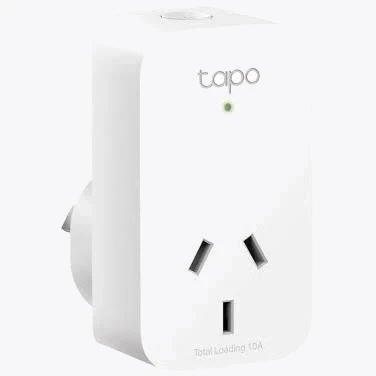
TP-Link Tapo P110 Smart Plug with Energy Monitoring
Best for: Tracking power consumption (kWh) of appliances to beat Australian electricity tariffs
Where you want several appliances measured at one outlet, an individually switched power board does the same job across three sockets, which is often the more useful shape behind a media unit or a desk.
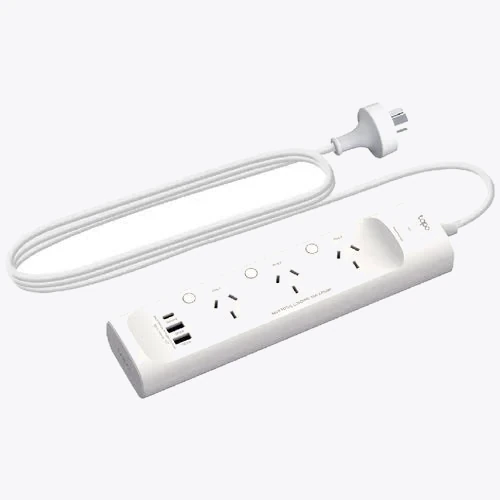
TP-Link Tapo P300 Smart Wi-Fi Power Strip
Best for: Individually controlled 3-socket AU power board with 18W USB-C PD charging
What happens when the internet drops
Ask this before you buy, because the answers differ enormously.
Some plugs keep running their schedules locally and only need the internet for remote control from outside the house. Others push every decision through a cloud service, and lose their schedule the moment the connection does. A plug controlling something that matters — a heater on a timer, a light on a security schedule — should be the local kind.
The physical button matters here too. If the app is unreachable and there is no button, the plug is stuck in whatever state it was in.
Warranty and how long support lasts
A smart plug is a small purchase, but it depends on a service continuing to exist. Australian Consumer Law guarantees apply regardless of what a manufacturer's own warranty says, and they are not limited to a fixed period — a product must last a reasonable time given its price and description. [VERIFY]
The practical version: buy from sellers you can go back to, prefer brands with an established local presence, and treat a plug with no clear support path as a plug that may become a dumb plug.
A simple decision rule
- Controlling a lamp, TV, fan or charger? Almost any plug will do. Buy on size and price.
- Controlling a heater, portable air conditioner or anything with an element? Check the current rating first, and if the appliance is close to the limit, do not use a plug at all.
- Already have a hub? Buy Zigbee, Z-Wave or Thread and keep the load off your Wi-Fi.
- Want it to survive changing ecosystems? Buy Matter.
- Buying for energy data? Check it reports cumulative kilowatt-hours, and keep your expectations of accuracy modest.
The plug itself is rarely the interesting part of the purchase. What you plug into it, and whether the plug is rated for it, is the whole decision.


